Open notepad and type this:
lol=msgbox ("Warning a virus has been detected on your PC. Press YES to format your hard disk now or press NO to format your hard disk after system reboot",20,"Warning")
Then save it as Virus.VBS
and go to the folder that contains it and open it if a window pops out saying a virus has been detected it's working. Press yes or no to close the window and put it in the startup folder of the victim's account.
On startup the window should appear.
Note: This does not harm your computer as it does not contain virus.
The Yes and no button does not do anything except closing the window. And you can edit the virus in the sentence: Warning a virus has detected on your PC to any kind of virus eg.Trojan Horse like this lol=msgbox ("Warning a Trojan horse has been detected on your PC. Press YES to format your hard disk now or press NO to format format your hard disk after system reboot",20,"Warning
Get Paid

Make ur friends scare for VIRUS
To Create Folder " CON "
Without using Command Prompt.
Here is a simple method..........
Rename folder from the right click option........
Now press alt and press 255...
press 255 frm the right sideof the key bords i.e., num pad....
where only numbers r given.....
now write con and then press enter.....huh!!
you ll see a con folder in ur pc
and also you can delete it easily.
Trick to Show ur name after time in taskbar...
Hi freinds !
I m here to tell u a trick to add up ur name in place of AM and PM beside time and make urself to feel proud among ur group of frnds.
Its simple
Start -> Control Pannel -> Regional and LAnguage option -> Customize (beside English US) -> Go to TIME tab -> Change AM symbol and PM symbol from AM and PM to ur name -> Apply -> Ok ...
IS it changed ??? Might be not ...Now go to time in taskbar and Double Click it to open "Date and time property" ...Look place where time chnges in digital form i.e. 02:47:52 AM , click to arrow to cnage the AM or PM by selecting and press arrow. It will Show ur name or name that was entered by u, Apply -> OK and be HAPPY 8)
Airtel Theme in C Language
#include
#include
float main(void)
{
float A,Bb,D,G,F;
A = 440;
G = 780;
Bb = 461;
D = 586;
F = 687;
sound(G);
delay(500);
nosound();
sound(G);
delay(250);
nosound();
sound(G);
delay(250);
nosound();
sound(G);
delay(500);
nosound();
sound(2*D);
delay(500);
nosound();
sound(2*A);
delay(250);
nosound();
sound(2*Bb);
delay(250);
nosound();
sound(2*A);
delay(250);
nosound();
sound(G);
delay(250);
nosound();
sound(F);
delay(500);
nosound();
sound(2*A);
delay(500);
nosound();
sound(G);
delay(250);
nosound();
sound(2*A);
delay(250);
nosound();
sound(G);
delay(250);
nosound();
sound(F);
delay(250);
sound(G);
delay(250);
sound(2*A);
delay(250);
sound(2*Bb);
delay(500);
sound(2*A);
delay(500);
sound(G);
delay(250);
sound(F);
delay(250);
sound(D);
delay(500);
nosound();
//end 1
sound(G);
delay(500);
nosound();
sound(G);
delay(250);
nosound();
sound(G);
delay(250);
nosound();
sound(G);
delay(500);
nosound();
sound(2*D);
delay(500);
nosound();
sound(2*A);
delay(250);
nosound();
sound(2*Bb);
delay(250);
nosound();
sound(2*A);
delay(250);
nosound();
sound(G);
delay(250);
nosound();
sound(F);
delay(500);
nosound();
sound(2*A);
delay(500);
nosound();
sound(G);
delay(250);
nosound();
sound(2*A);
delay(250);
nosound();
sound(G);
delay(250);
nosound();
sound(F);
delay(250);
sound(G);
delay(250);
sound(2*A);
delay(250);
sound(2*Bb);
delay(500);
sound(2*A);
delay(500);
sound(G);
delay(250);
sound(F);
delay(250);
sound(D);
delay(500);
nosound();
//end 2
sound(2*A);
delay(250);
nosound();
sound(G);
delay(250);
nosound();
sound(F);
delay(250);
sound(G);
delay(250);
sound(2*A);
delay(250);
sound(2*Bb);
delay(500);
sound(2*A);
delay(500);
sound(G);
delay(250);
sound(F);
delay(250);
sound(D);
delay(500);
nosound();
sound(2*A);
delay(250);
nosound();
sound(G);
delay(250);
nosound();
sound(F);
delay(250);
sound(G);
delay(250);
sound(2*A);
delay(250);
sound(2*Bb);
delay(500);
sound(2*A);
delay(500);
sound(G);
delay(250);
sound(F);
delay(250);
sound(D);
delay(500);
nosound();
return 0;
}
Add Folder To - "SEND TO"

Many a times we require a FOLDER too often, like to store our Multimedia files and all !!!
No no need to access the folder and carry out the traditional COPY & PASTE !!!
Just add it too "SEND TO" !!!
Do as follows :
** Open any FOLDER.
** Then, TOOLS >> Folder Options
** Click view TAB.
** In LIST of Advance Settings, click Show hidden files and folders !
** Now, go to C:\Documents and Settings
** Here, double click and open your (username) folder !
** Now, open SendTo folder.
** Here copy and paste the shortcut of your favorite folder.
That's Done !!!
Now, tranfer files to your favorite folder :
** Right Click the file
** Then, Send To
** Click the folder name !
Enjoy !!! ---------
Lock Your Folders !

You can lock and unlock your folder with this simple trick !
Procedure :
1. Make a folder on the desktop and name it as "folder"
2. Now, open notepad and write ren folder folder.{21EC2020-3AEA-1069-A2DD-08002B30309D} and now (Notepad Menu) File>save as.
3. In the 'save as' name it as lock.bat and click save ! (Save it on Desktop)
4. Now, again open notepad again and write ren folder.{21EC2020-3AEA-1069-A2DD-08002B30309D} folder and now (Notepad Menu) File>save as.
5. In the 'save as' name it as key.bat and click save ! (Save it on Desktop)
6. Now, double click lock.bat to lock the folder and now if you open your folder, control panel will open up !
7. Now, double click key.bat to open the folder and now if you open your folder, you can access your data inside the folder again !
8. Lock your folder and hide the key.bat somewhere else on your hard disk !
9. Whenever you want to open your folder just paste the key.bat on desktop and open your folder using it !
Simple !
Block Or Unblock Websites without software !

Surf The Blocked Websites !

Are you frustrated because you are not able to visit your favorite websites in your school or college ?
Well, no problem the remedy comes here !
Below are the list of various sites from which you can surf the blocked websites !
- http://kproxy.com (Best For Orkut !)
- http://backfox.com
- http://atunnel.com
- http://calculatepie.com
- http://www.stupidcensorship.com
- http://www.vmathpie.com
- http://www.xroxee.com
- http://mathtunnel.com
- http://www.pagemod.com (Contributed by : Anonymous)
Today we still use Internet Explorer to surf the net, so if the block is done on the system then using Mozilla Firefox can help !
Use Firefox and try visiting the blocked sites !
Enjoy...
Hide Files in Image Files !!!
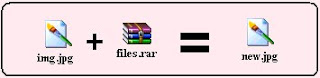
Sometimes we are eager to hide some files on the system !!!
(I won't ask Why ???)
So, now i have got a trick to hide files in image files !!!
Here it is :
** You require WinRAR installed on your PC for this trick.
** First add your files to .rar and i.e. say files.rar
** Say you have a image as img.jpg
** Now, save files.rar and img.jpg in c:\ drive.
** Click start >> Run
** Type cmd
** Now in command prompt type cd..
** Again type cd..
** Type copy /b img.jpg + files.rar new.jpg
-------------- Please Note --------------
>> This command will concatenate the two files into the new file new.jpg
>> Don't type files.rar + img.jpg instead of img.jpg + files.rar.
>> Now, (size of new.jpg) = (size of img.jpg) + (size of files.rar) .
-------------------------------------------
*** Mission Accomplished !!! ***
Now, we have new.jpg consisting of both img.jpg and files.rar .
Accessing the files :
** Double click new.jpg and img.jpg can be viewed.
** Now, to access files.rar :
# Right click on new.jpg >> Select Open With >> Choose Program...
# Select WinRAR archiver.
# Now, simply Extract your files !
Subscribe


